
Contents
- Overview
- When This Process Occurs
- Appsettings Configuration
- What Message Type Is Supported
- How Telematics Data Is Retrieved And Appended
- Getting Duty Status Telematics Data
- Getting Tractor Vehicle Telematics Data
- Getting Trailer Telematics Data
Overview
The GeotabTelematicsMessageProcessor is a configurable service within the integration that is triggered during inbound message processing and is responsible for adding telematics data retrieved from Geotab to Form type messages allowing this information to be audited within the database. This audited telematics data provides valuable historical context at the date and time of a form submission including details such as the driver’s duty status, assigned tractor and trailers, vehicle location by latitude and longitude, and more: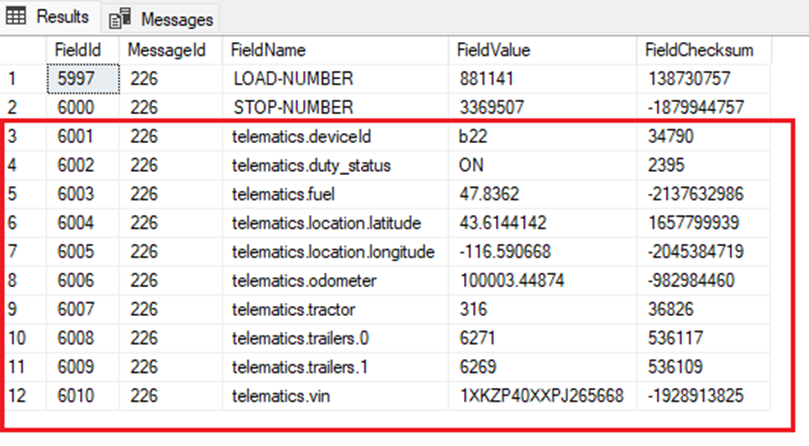
When This Process Occurs
When the MessagingController receives an inbound message and validates the request, the GeotabTelematicsMessageProcessor is immediately triggered after this where it first checks the proper appsettings are enabled and then validates that the message type it is processing is a Form type message.
Appsettings Configuration
While a customer using Geotab should already have Geotab enabled and their Geotab database configured, the following settings are ones that should be confirmed to be enabled and configured for the GeotabTelematicsMessageProcessor to be able to retrieve the data it needs from the connected Geotab database: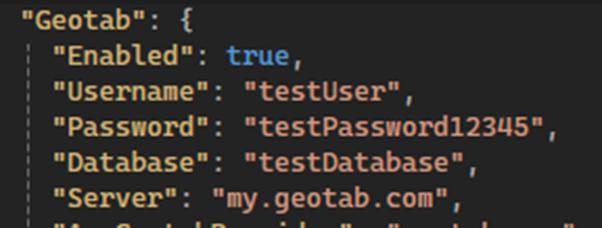
These Geotab settings should be configured to enable Geotab and point to a valid database where telematics data can be retrieved.

This setting is what can be enabled and disabled for finer control of whether the GeotabTelematicsMessageProcessor can retrieve and append the telematics data to form messages.
What Message Type Is Supported
For the two different message types that the integration handles, Form and Text, we only audit fields from form submissions. Text messages will never have telematics data appended to them.
How Telematics Data Is Retrieved And Appended
Once the GeotabTelematicsMessageProcessor has verified the proper settings are configured and that the message is the proper Form type, it creates a new message telematics object that will store any retrieved telematics data to be referenced later during auditing. The GeotabTelematicsMessageProcessor then proceeds to call methods in the GeotabService which connect to and retrieve from the Geotab database via API calls. Data retrieval is based on the Eleos user who submitted the form.
Getting Duty Status Telematics Data
The first API call that is made is for getting the most recent DutyStatusLog data for the user that submitted the form message. Using the username property from the message and the datetime it was composed at. These form values are then passed as method parameters to the GeotabService which formats and passes the data forward via search parameters within the respective API call. If the resulting duty status is not null for the driver, we will append their duty status to their message:

Other statuses besides “ON” that this duty status could be, if not null, are “OFF”, “D”, “PC”, “YM”, “SB”, or “SituationalDrivingClear”.
Getting Tractor Vehicle Telematics Data
The next API calls that are made are for getting the vehicle’s most recent telematics data which includes the device id, VIN number, tractor name, odometer value, fuel level, and location coordinates. All sourced from a combination of Device, StatusData, and LogRecord data within Geotab, based on the user that submitted the form message and their assigned vehicle.
Using the telematics username property and the message’s ComposedAt datetime, info is passed as method parameters through the GeotabService and into multiple API calls against the Geotab database. Using the request responses, additional API calls are built and executed for additional information. If the resulting location and status data is not null, the integration will parse and append the retrieved vehicle data from the Geotab database as shown below:
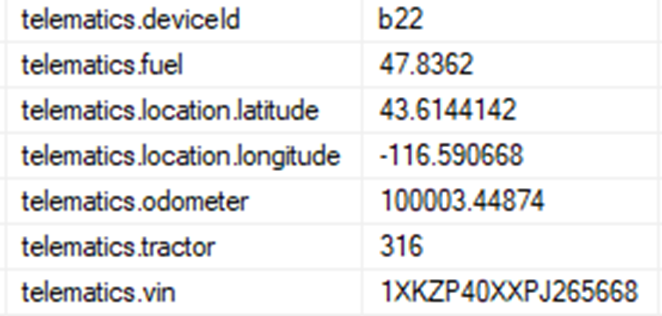
If we didn’t get a value for one of the audited fields for the vehicle data, it will show an empty string in the value column, but we will still include the vehicle data field in the name column.
Getting Trailer Telematics Data
The last API call is used to retrieve trailer telematics data based on the trailer associated with the tractor in Geotab. Unlike other telematics data audited in the database, trailer telematics data is only audited when one or more trailers are found. This can vary based on the number of resulting trailers associated with a vehicle.
Since trailer telematics data relies first on having an associated vehicle, if no results are found during the tractor lookups in “Getting Tractor Vehicle Telematics Data”, no attempt will be made via the API to retrieve trailer telematics data.
When vehicle telematics and status data are present, the integration will use the unique Geotab device id of the vehicle and the Form message’s ComposedAt datetime to call a method in GeotabService. Data is passed as method parameters and converted internally to search parameters within the defined API calls executed against the Geotab database. If Trailer Attachments are returned in the API response, fields are appended to the message. If no Trailer attachments are returned, the integration will omit the Trailer field entirely from the message.

If no trailer attachments were found, both field names and values of rows seen in the example above would not be present on the record within the database.